

Anaplan CoModeler との会話では、テキストベースの CSV ファイルを添付できます。こうした仕様ファイルは、CoModeler に何を実行してもらいたいのかを説明するのに役立ちます。構造化された入力により、詳細を一貫性のある再利用可能な方法で提供できます。
を使用して CSV ファイル入力を CoModeler の会話に添付し、プロンプト内でそれらを参照します。典型的なシナリオとしては、新しいモデルの仕様の提供や、リストの管理と入力などが挙げられます。
CSV 仕様ファイル — 新しいモデルの例
この例は新しいモデルの仕様ファイルを示しています。サンプルのプロンプティングでは、CoModeler に仕様ファイルと達成したいことを伝えています。
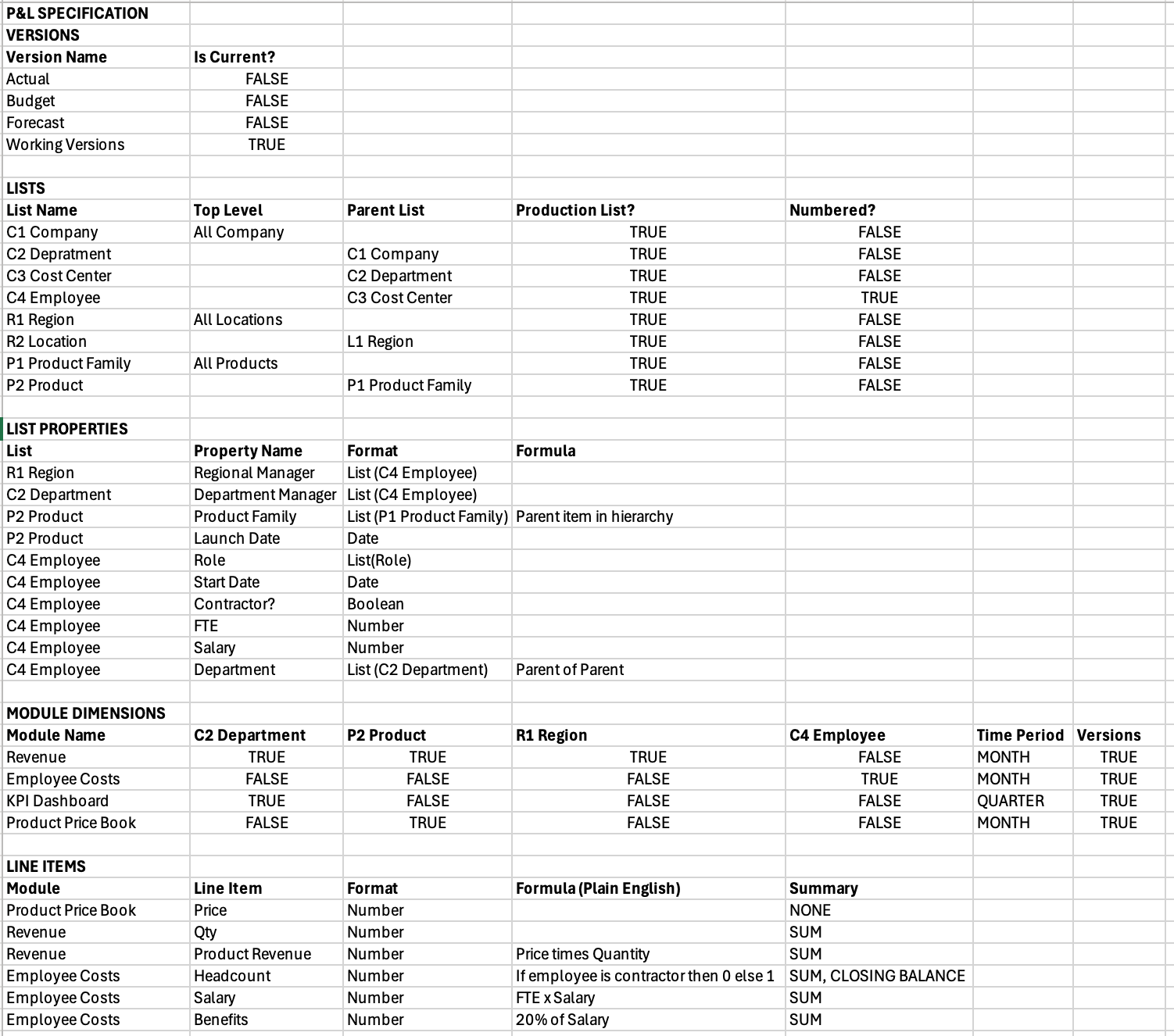
こちらは、この仕様を参照しているサンプルのプロンプティングです。
Build a P&L model from the attached CSV specification.
File Structure:
- VERSIONS - Versions to add.
- LISTS - Lists to add.
- LIST PROPERTIES - Add properties to a new List Properties module for each List.Do this instead of adding the properties into the List properties directly.
- MODULE DIMENSIONS - TRUE/FALSE matrix of Applies To for the module.
- LINE ITEMS - Line items with their modules and formulas to be created.
Instructions:
1. Add all versions if they don't already exist.
2.Create ALL lists with parent-child relationships.
3. Create a new List Properties module called "<List Name> Properties" for each List.
4. Add properties as new line items to the respective List Properties modules.
5.Build modules using TRUE dimensions only.
注記:この例ではプロンプティングを一つだけ使用しています。一連のプロンプティングを使用しても同じ結果が得られます。ただし、この方法を選択した場合、コンテキストを維持するために仕様ファイルを再度提供する必要があります。会話コンテキストの詳細については、「Anaplan CoModeler の概要」を参照してください。
CSV 仕様ファイル — リストの例
仕様ファイルは、リストなどのモデル オブジェクトを作成するのに最適です。こちらは従業員リストの例と、リスト アイテムとプロパティを作成するためのプロンプトです。

| 目的 | プロンプティング |
| リスト アイテムを作成する。 | For each employee in the employees.csv file, add a new list item to the Employees list.Use "Employee ID" as code, and "Name" as name. |
| リスト プロパティを作成する。 | Using employees.csv, add each field from "Position" onwards as new line items in a new module called "SYS Employee Properties" with the Employees list in Applies To.Use percentage number format with 1 decimal place for percentage fields, and default number format for all other numeric fields.For all other line items, choose the format closest to the data type in the csv. |

