
Learn about new Anaplan features and enhancements introduced in August 2026.
Workflow
Customizable email notifications
We've improved Notification tasks in Anaplan Workflow. Workflow builders now have more control over notification emails, enabling them to add vital context and tailor messages to their audience.
We've added:
- Custom subject lines: You can now write custom subject lines (up to 500 characters) that tell users exactly what the email is about.
- Custom intros and outros: You can now personalize your emails with dedicated Intro and Outro fields, supporting up to 1,000 characters each. You can add specific instructions, custom greetings, or next steps.
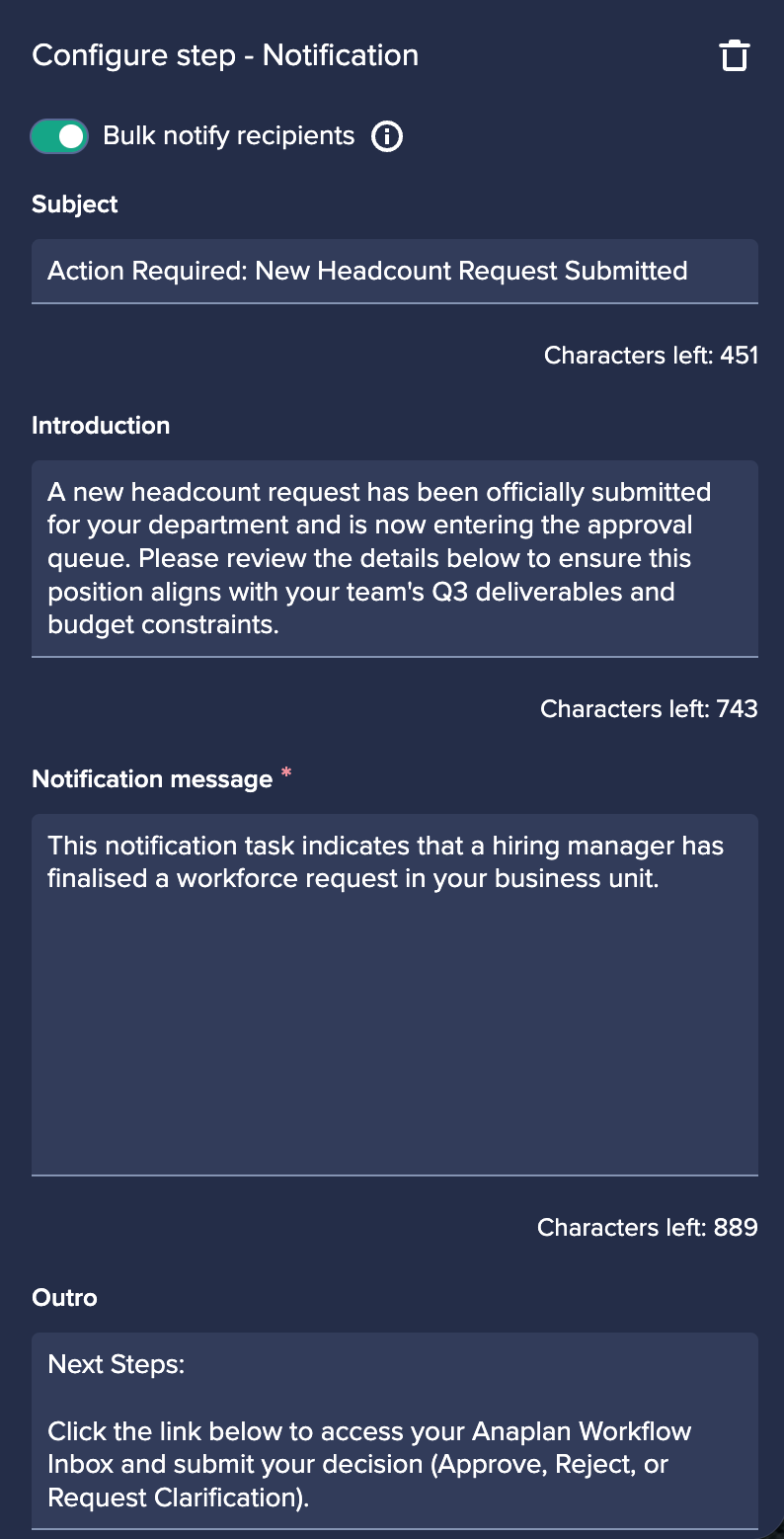
Learn more in Create a notification step.
CoModeler
General enhancements
CoModeler is now part of our standardized AI interface, hosted in AWS. It's now deployed on the Agent Platform, providing key benefits, such as improved reasoning capabilities and response accuracy, with a significantly larger context window. This enables it to easily process complex prompts and keep track of long conversations without losing sight of important details.
The underlying move from Azure to AWS also extends our regional coverage, providing faster connections, closer alignment to local data compliance rules, and stronger protection against downtime.
Conversation persistence
CoModeler can now persist conversations across page refreshes and other browser/re-authentication events, enabling users to 'pick up where they left off'. Conversation sessions are no longer lost if a user accidentally closes a conversation, or if the session becomes inactive and needs refreshing. While this won't enable users to store conversations, this is our first step toward fuller conversation history functionality.
Saved view capabilities
CoModeler can now read and return any saved views in a model. This makes it easier to find all your saved views.
Identify more details about your lists
We have enhanced the ability for CoModeler to query lists on more fields including top-level, parent hierarchy, selective access, production data, has workflow, subsets, numbered, display name property, item count, notes, reference in applied to, referenced as format, and referenced in formula.
Support for Japanese characters in chat history downloads
Japanese characters are now supported in chat history downloads. You can export PDFs with Japanese text rendered correctly.
Learn more in Anaplan CoModeler.
User Experience
Board insight panel enhancements
Page builders can now drag and drop cards seamlessly between the main board canvas and the Insights panel. This interaction makes it easier to reorganize layouts on the fly, move active cards into focus, and dynamically drill down into the key data that matters most.
Grid row level expand/collapse
We've introduced native expand/collapse functionality for grid cards, making it easier for you to navigate hierarchical data without leaving the grid. You can now expand or collapse hierarchy levels directly within the grid using row-level controls. This allows users to focus on the levels of detail that matter most while keeping larger hierarchies easy to explore. The feature is available for grid cards only and supports row hierarchies with a single dimension.
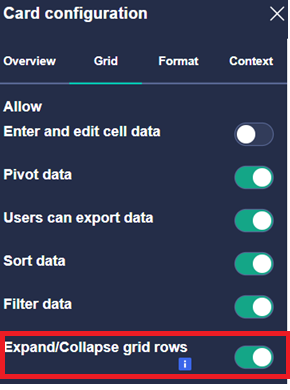
It can be enabled by toggling on the Expand/collapse grid rows option in Card configuration.
This feature fully supports existing grid configurations, including:
- Hide selections
- Filters
- Level selection
- Suppress empty
You can select the expand or collapse arrows next to a row member to move through hierarchy levels, and right-click a row member to access additional hierarchy actions:
- Expand: expands the selected level.
- Collapse: collapses the selected level.
- Expand Branch: expands all descendants of the selected member.
- Collapse Branch: collapses the selected member and all descendants.
- Expand All: expands all available hierarchy levels in the grid.
- Collapse All: returns the grid to its collapsed state.
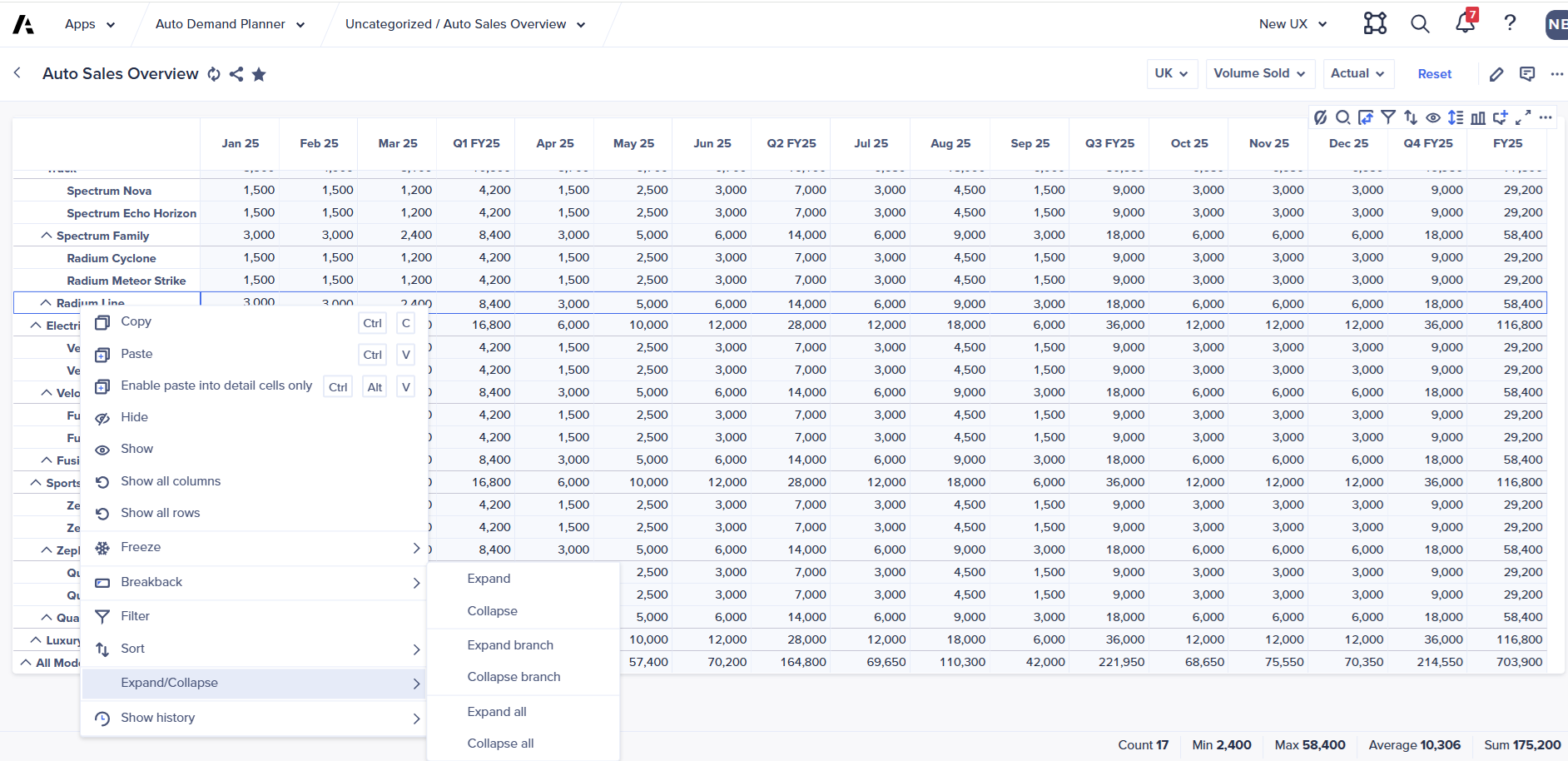
This enhancement provides a more intuitive way to explore hierarchical data while preserving compatibility with existing grid customizations and user selections.
Learn more in Expand or collapse grid rows.
Data Orchestrator actions in the User Experience
We have introduced several enhancements when including ADO data extracts and model links in the User Experience:
- Dataspace selection: Select the relevant dataspace when creating or configuring a data orchestration.
- Bulk add: Add multiple data extracts and model links at once, making large setups much faster.
- Search: Find exactly what you need quickly, with built-in search across your dataspace.
- Last run info: See when Data Orchestrator actions last ran, right from the configuration view.
- Reordering: Arrange your data extracts and model links in whatever order works best for you.
Note: The Integration administrator role is required to configure Data Orchestrator actions.
Learn how to Add Data Orchestrator actions to a Page.
Mobile
Expand/collapse grid rows on mobile
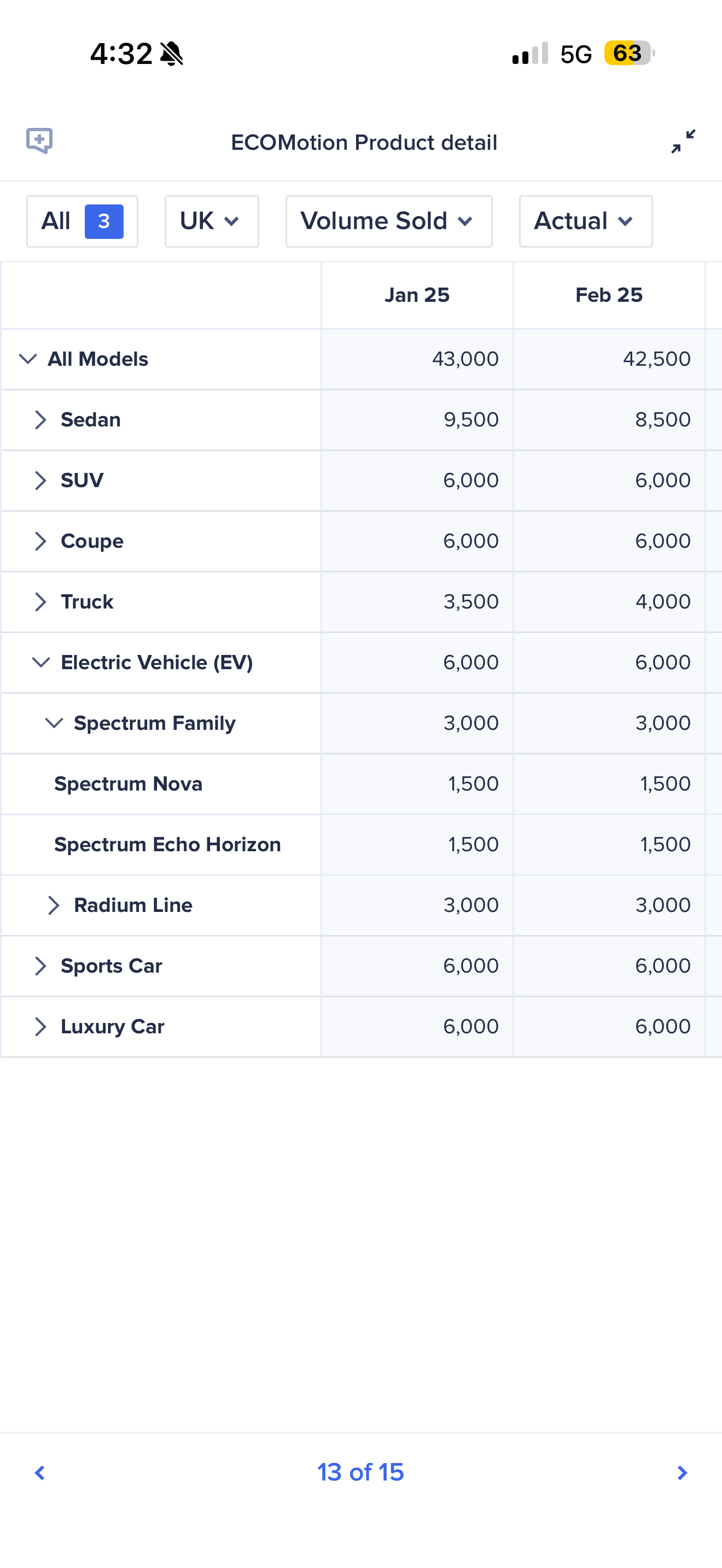
Mobile users can now expand and collapse hierarchical grid rows along a single dimension. This gives mobile and tablet users a clear, practical way to show or hide details on grids and presentation tables, helping them focus on key data.
Anaplan Data Orchestrator
Azure Blob Storage as a source and sink for ADO pipeline
- Pipelines can be created and configured with Azure Blob cloud storage as a source to import or read files into ADO datasets or models.
- Pipelines can be configured to write back from ADO datasets to CSV files in Azure Blob Storage.
- Pipelines can be used to update the data either on-demand or scheduled using Workflow.
Google Cloud Storage (GCS) as a source and sink for ADO pipeline
- Pipelines can be created and configured with Google Cloud Storage (GCS) as a source to import or read files into ADO datasets or models.
- Pipelines can be configured to write back from ADO datasets to CSV files in GCS.
- Pipelines can be used to update the data either on-demand or scheduled using Workflow.
SAP as a pipeline source
SAP connections are now available as a pipeline source.
Pipeline timeout
Pipeline executions will now time out after 24 hours and be automatically canceled.
Clone multiple links
The Integration administrator can now select multiple links for a model and clone them all to an ALM deployed version of that model with a single gesture. The selected links must all be to the same model.
Anaplan XL
Centered on performance responsiveness, legacy continuity, and client reliability, the Anaplan XL release version 2608 transitions writeback operations to non-blocking background execution, refines 4.4 workbook conversion and in-grid formula capabilities, and resolves key memory retention issues across long-running Excel sessions.
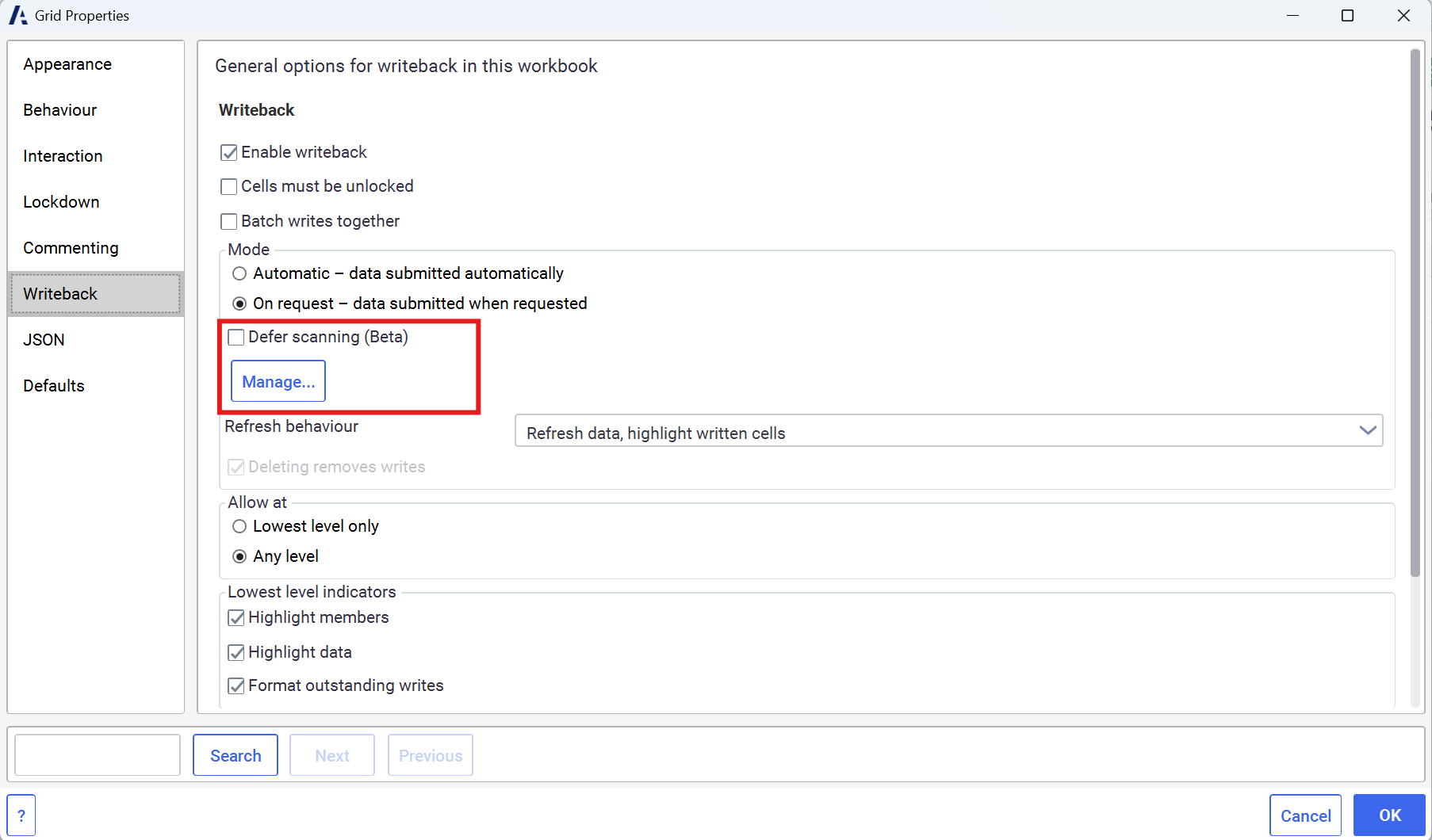
- Deferred Scanning: Users can now choose to postpone scanning while editing writable cells. When a scan or data submission is requested, the operation runs in the background, allowing Excel to remain fully interactive. This ensures users can continue working in Excel while scanning and submission occur seamlessly in the background.
- Seamless 4.4 Transition & Compatibility: Introduces a default "4.4-style" format sheet (Calibri 11 with black borders) applied automatically to converted legacy workbooks, and enables user formulas directly inside grids.
- Robust System & Memory Optimization: Fixes a further memory leak by properly releasing grid properties view models.

