Explore various Multi Dimensional Calculation examples to gain insights into how these calculations operate across different scenarios.
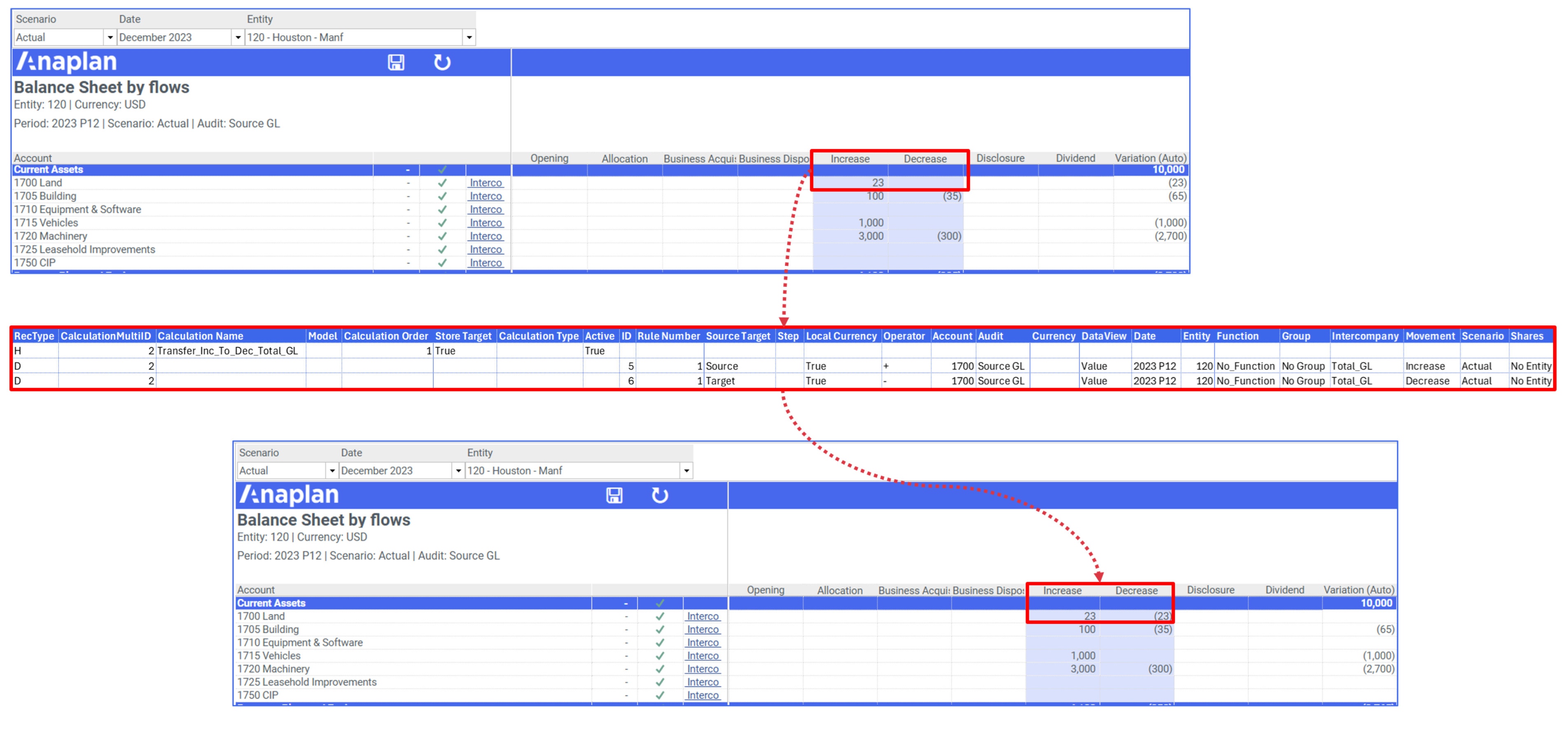
Simple data copy
This calculation will copy data from Account 1700 from the Increase movement to the Decrease Movement in Intercompany Member Total_GL.
| Field | Definition |
| Calculation Name | Transfer_Inc_To_Dec_Total_GL |
| Model * | If no model is defined, the calculation will run on any model selected at run time. |
| Calculation Order | 1 |
| Store Target | True |
| Calculation Type | |
| Active | True |
Details
| Field | Row1 | Row2 |
| Rule Number | 1 | 1 |
| Source Target | Source | Target |
| Step | No step number is needed if the calculation only contains additions and/or subtractions. | |
| Local Currency | True | True |
| Operator | + | - |
| Account | 1700 | 1700 |
| Audit | Source GL | Source GL |
| Currency | Any dimension left blank will run on all members in that dimension. | |
| Dataview | Value | ValueCalc |
| Date | ||
| Entity | ||
| Function | No Function | No Function |
| Group | No Group | No Group |
| Intercompany | Total_GL | Total_GL |
| Movement | Increase | Decrease |
| Scenario | ||
| Shares | No Entity | No Entity |
Results
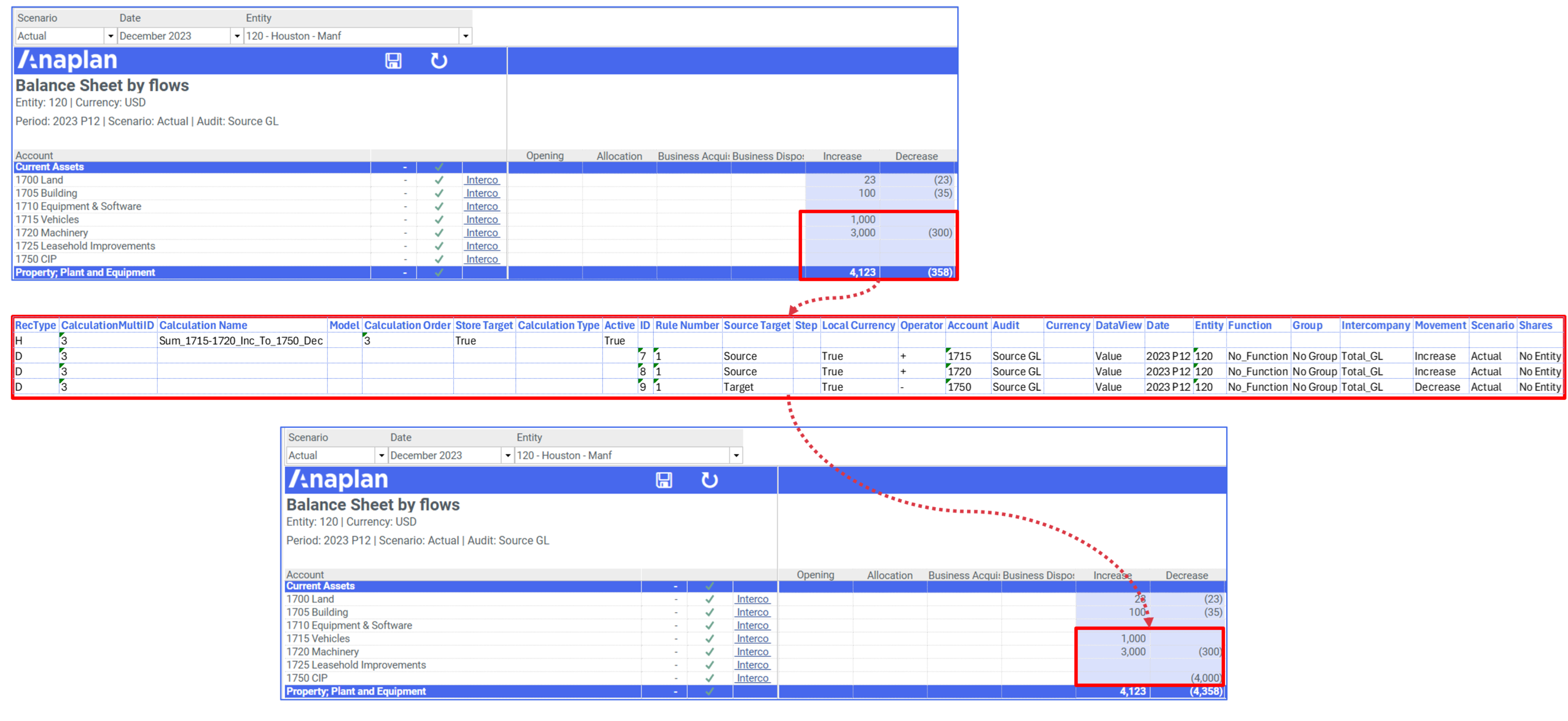
Multiple sources in one calculation
This calculation will sum accounts 1715 and1750 and reverse that amount into the Decrease Movement in Intercompany Member Total_GL.
Header
| Field | Definition |
| Calculation Name | Sum_1715-1720_Inc_To_1750_Dec |
| Model | |
| Calculation Order | 1 |
| Store Target | True |
| Calculation Type | |
| Active | True |
Details
| Field | Row1 | Row2 | Row3 |
| Rule Number | 1 | 1 | 1 |
| Source Target | Source | Source | Target Calculations can have multiple sources, but they must only have one target. |
| Step | |||
| Local Currency | True | True | True |
| Operator | + | + | - |
| Account | 1715 | 1720 | 1750 |
| Audit | Source GL | Source GL | Source GL |
| Currency | |||
| Dataview | Value | Value | ValueCalc |
| Date | |||
| Entity | 120 | 120 | 120 |
| Function | No Function | No Function | No Function |
| Group | No Group | No Group | No Group |
| Intercompany | Total_GL | Total_GL | Total_GL |
| Movement | Increase | Increase | Decrease |
| Scenario | |||
| Shares | No Entity | No Entity | No Entity |
Results
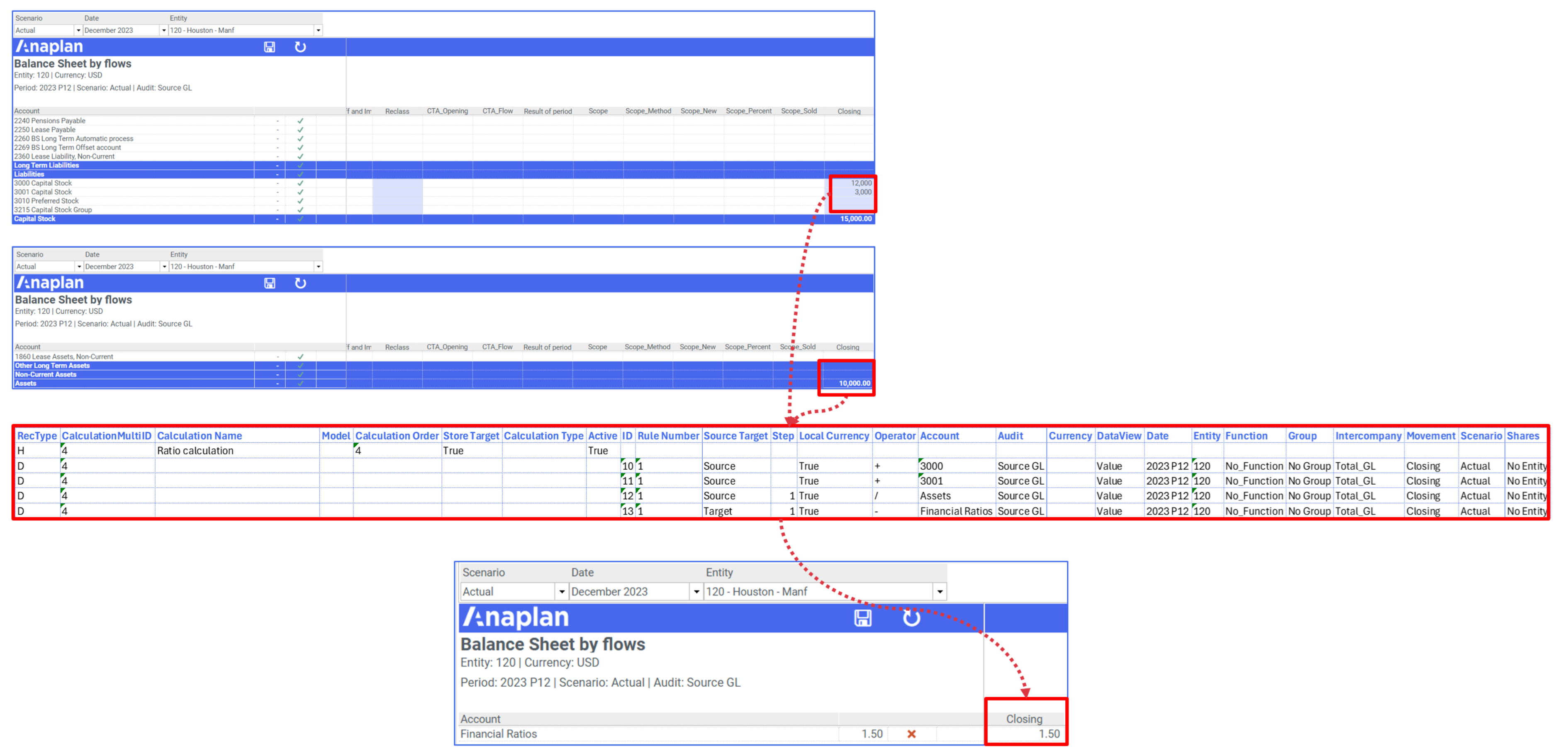
Ratio calculation
This calculation will calculate Shareholder Equity/Total Assets.
Header
| Field | Definition |
| Calculation Name | Ratio calculation |
| Model | |
| Calculation Order | 1 |
| Store Target | True |
| Calculation Type | |
| Active | True |
Details
| Field | Row1 | Row2 | Row3 | Row4 |
| Source Target | Source | Source | Source | Target |
| Step***** | As this calculation contains a division, the step number must be increased to define the BEDMAS calculation order. | 1 | 1 | |
| Local Currency | True | True | True | True |
| Operator | + | + | / | - The Multi Dimensional calculation makes use of the Debit/Credit status of an account. In some cases, such as this Ratio calculation, the Target needs to have an operator of - to account for this sign change. |
| Account | 3000 | 3001 | Assets | Financial Ratios |
| Audit | Source GL | Source GL | Source GL | Source GL |
| Currency | ||||
| Dataview | Value | Value | Value | ValueCalc |
| Date | ||||
| Entity | 120 | 120 | 120 | 120 |
| Function | No Function | No Function | No Function | No Function |
| Group | No Group | No Group | No Group | No Group |
| Intercompany | Total_GL | Total_GL | Total_GL | Total_GL |
| Movement | Closing | Closing | Closing | Closing |
| Scenario | ||||
| Shares | No Entity | No Entity | No Entity | No Entity |
Results