

This page provides a comprehensive guide to understand and navigate the setup of the consolidation functionality to ensure a smooth and efficient consolidation implementation.
It's divided into two distinct sections:
- Configuring Consolidation calculations – Guides you through the process of setting up essential calculations.
- Consolidation Process – Outlines the step-by-step consolidation process.
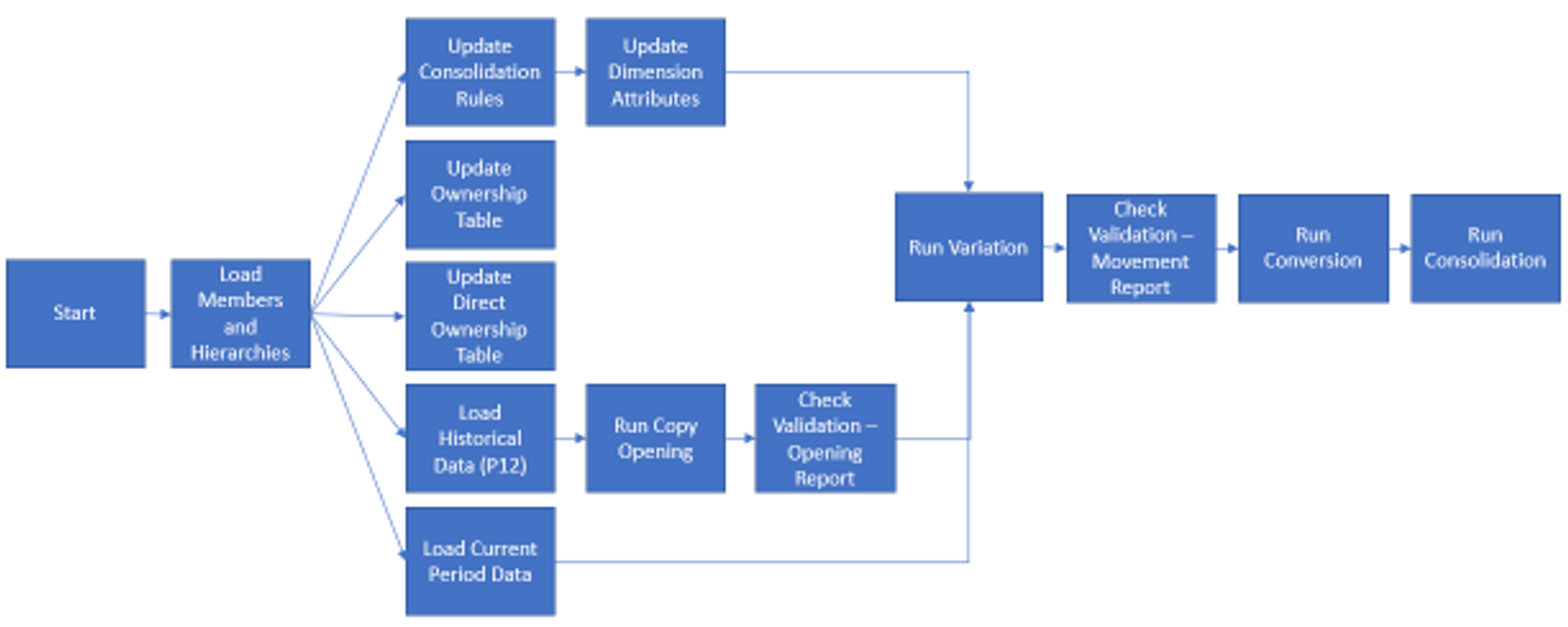
Use the flow diagram to understand the steps you should follow and the dependencies.
Provision a tenant
To provision a tenant, contact Anaplan support .
Before contacting Support, gather information:
- Product Category
- Financial Consolidation
- Transaction Matching
- Anaplan XL Reporting
- Disclosure Management
You will need to provide:
- Company name
- Company domain
- Company tenant name. Choose a short name. For example, if the Company name is ABC Wired Incorporated, a possible name would be ABC Wired.
- Customer contact name, email, and phone number
- Partner contact name, email, and phone number
- Number of Anaplan XL Reporting user licenses, if applicable
- Location of tenant, for example, North America, Europe, Asia, Asia/Pacific, etc.
- List of Initial access credentials for implementation team users, including names and emails. Identify whether implementation users already exist, or have a @anaplan.app ID, and provide the current user name.

