

Auto-generated lines reduce the need for executing additional calculations, reinforce data consistency, and reflect accounting logic. In the legacy journal module, the system generated these lines at the model level. With the enhanced journals module, you can view these lines directly at the journal entry level. This will increase transparency and auditability of journal data.
The system follows specific rules to create them on journal save and decides when and how to automatically create the generated rows.
The different scenarios that explain this logic are:
Current Year Net Income from profit and loss accounts
Whenever a journal entry includes a Profit and Loss account under the #NetIncome tag is used, Anaplan automatically generates rows for the Current Earnings account with sysname - current earnings, with movements — Result for the period with sysname - Result period, and Closing with sysname — closing.

Current Year Net Income calculation with multiple income and expense accounts
When a journal entry contains multiple profit and loss Accounts under #NetIncome tag, the system nets off the debit and credit amounts to calculate the net profit and loss and post to the Current Earnings account with the sysname - current earnings with movements — Result for the period, sys name — Result period, and Closing with the sys name — closing.

Balance sheet accounts
When a journal entry includes Closing balance for balance sheet accounts based on individual movements, the system will generate an additional row for each Balance Sheet account. It nets off each debit and credit balance in each account to the Closing balance movement based on sysname — Closing.

Current Year Net Income posting with #TotalDimensionLeaf member
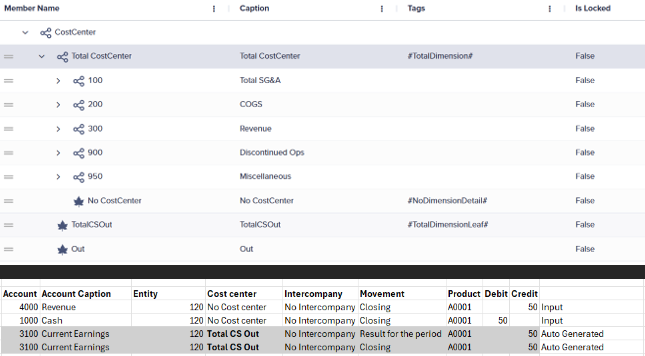
Whenever you use a Profit and Loss account, the system generates rows for the Current Earnings account with a sys name - Current Earnings, with movements - Result for the period with a sys name - Result period and Closing with a sys name — closing. Additionally, if you set the #TotalDimensionLeaf member tag for any Other type dimension, the system generates the current earnings account to that member instead of the originally entered member.
In the example, TotalCSOut serves as the #TotalDimensionLeaf member in the Cost Center dimension. The system generates the current earnings entry with this member of the Cost Center dimension. Similarly, Other type dimensions can have a specific #TotalDimensionLeaf member.
Variation movement for Balance sheet accounts based on closing balance
When you add a row to a balance sheet account with a Closing movement, the system generates a line for the Variation movement with the same balance sheet account. This ensures the movements match the closing balance.


