

A Workflow process is a series of tasks connected by arrows. One of the primary ways users interact with the Anaplan Financial Consolidation application is through workflow processes.
Workflow is monitored from the homepage. Select a workflow name from the Workflow Status section on the homepage to access the list of workflow tasks in the Workflow module.
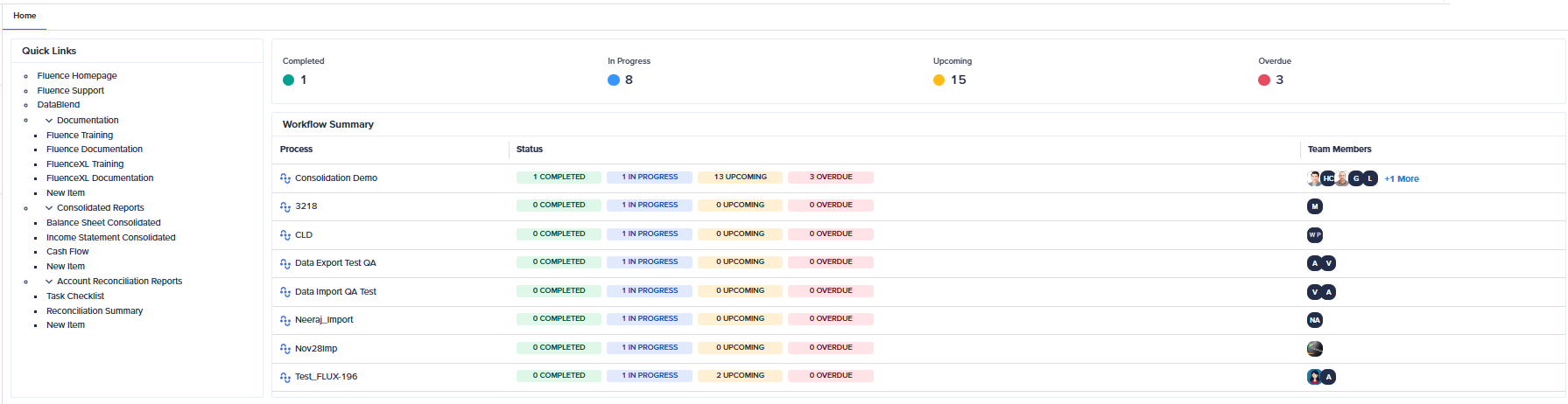
The key components of a workflow process include:
- Task assignment: Assign tasks to specific team members, ensuring accountability and clear responsibility.
- Track task progress: Monitor task progress in real-time, providing insights into completion rates and potential bottlenecks.
- Deadline management: Set deadlines for tasks to maintain timelines and prioritize critical activities.
- Notifications and Alerts: Receive updates and reminders for task deadlines and changes in workflow status.
- Approval process: Submit tasks for approval, facilitating structured decision-making and quality assurance.
- Collaboration tools: Communicate directly with team members within the workflow, improving coordination and teamwork.
Note: Anaplan limits workflow edits. Editing a workflow while it runs can cause unexpected behavior, so Anaplan doesn't allow you to edit running workflows. You can still view the task pane and assign owners, supervisors, and contributors using the Assign Activities editor in a running workflow.

