

Intercompany rules are created from scratch, as it's difficult to predict the accounts that a customer will want to eliminate. Your provisioned system has a sample rule for intercompany transactions based on the standard chart of accounts. You can use this rule as a guide to create intercompany rules for customers' specific intercompany elimination needs.
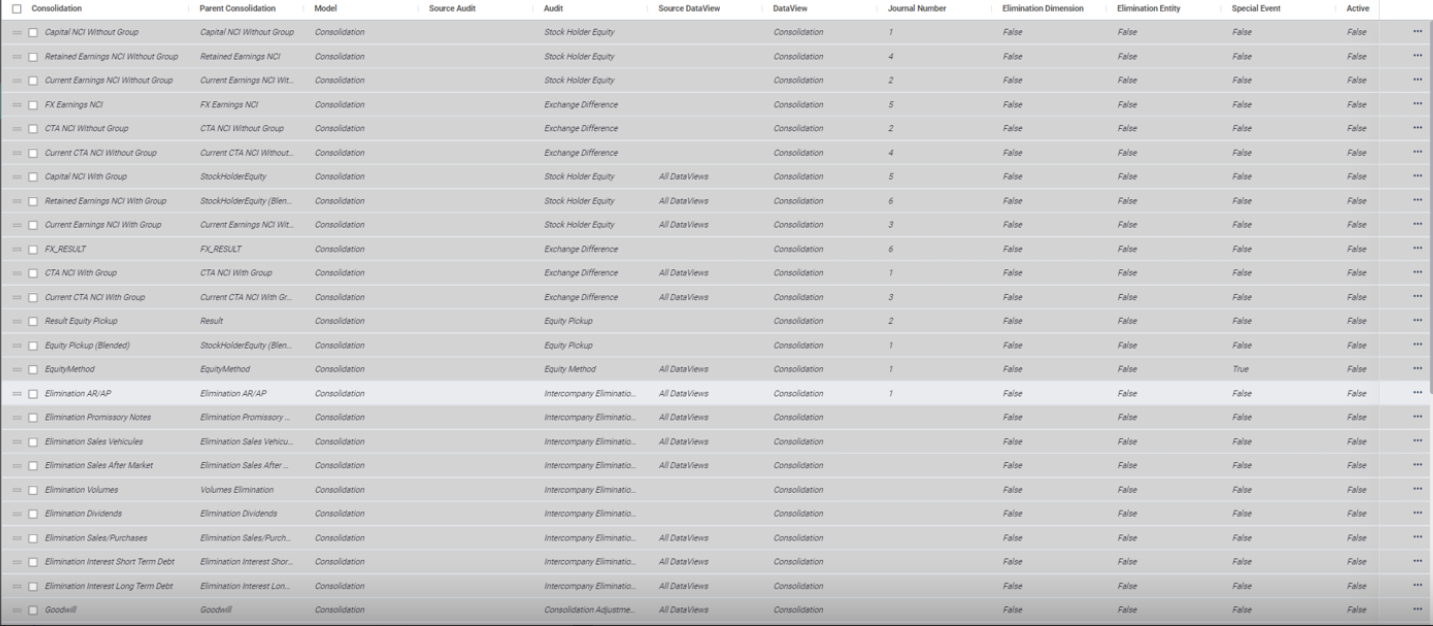
Navigate to the Maintain module and select the Consolidation Rules link under the Consolidation card.
Note: Only one consolidation rule is required for each intercompany pairing, such as intercompany AR and AP.
Create new intercompany elimination rule
These steps will need to be repeated for each intercompany account rule. To create a new Intercompany Elimination rule:
- Select Create from the toolbar to add a new Consolidation Rule.
A row is added at the bottom of the form.
| Parameter | Action |
| Consolidation | Enter the rule name, for example, Elimination AR and AP. |
| Parent Consolidation | Select from the dropdown name of the parent consolidation. Usually, it's the same name as the consolidation rule name. |
| Model | Select data model, which is usually Consolidation. |
| Audit | Select the Audit member name, which is usually IntercompanyEliminations. |
| Source DataView | Select All Dataviews from the list. |
| DataView | Select Consolidation from the list. |
| Journal Number | Select a number for the Journal Number. This number should be unique and appear in the Automatic Journal Entry report. |
| Elimination Dimension | Select No. |
| Elimination Entity | Select No. |
| Special Event | Select No. |
| Active | Select Yes. |
| Start Date | Enter the start date. This field can be left blank. |
| End Date | Enter the end date. This field can be left blank. |
- Select Save from the Toolbar.
- Select the checkbox beside the rule to specify details of the newly created rule.
- Select Create on the Details toolbar and add two new rows to the details form.
Once the rows have been added, complete the fields.- The first row is to eliminate the AR or AP amounts and is standard from one customer to the next.
- The second row is to record the eliminated amount in the offset account. Select the offset account for the intercompany account pairing that you are eliminating as all other fields are standard.

- Select Save, once all fields have been completed.
- Repeat the above steps to create more intercompany account rules.

