

This option reverses both source sets and reclassifies the net balance to the target account based on whether the net balance is positive or negative.
This option uses a dedicated setting called Reverse Details in the Account Netting field in the Settings form.
Reverse Details example:
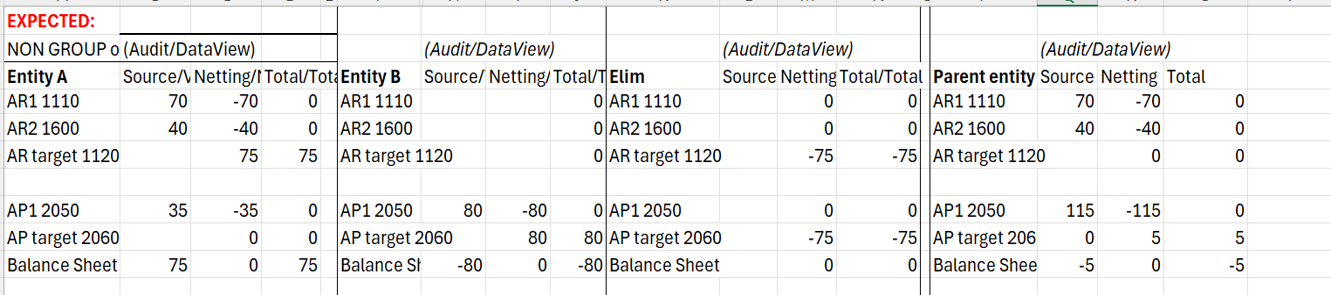
In the example, the parent entity consists of three leaf members: Entity A, Entity B, and the Elim Entity. Entity A and Entity B carry accounts receivable and accounts payable. They net to off to either receivables or payables.
- Entity A has AR1 1110 with a balance of 70 and AR2 1600 with a balance of 40 — leading to total receivables of 110.
- Entity A also holds a payable account, AP1 2050, with a balance of 35. Entity B holds AP1 2050 with a balance of 80.
At the parent level, receivables total 110 and payables total 115. Overall, payables should carry a net balance of 5, but netting will start standalone with Entity A and Entity B.
Anaplan Financial Consolidation and Reporting performs netting that reverses both source sets — receivables and payables alike — and reclassifies the net balance into the selected target account.
Entity A nets to 75 in AR target 1120. Entity B nets to 80 in AP target 2060. The Elim entity reverses the overlapping 75 from each AR Target and AP Target. This leaves the parent with a consolidated net position zero in AR target 1120 and 5 in AP target 2060.
The Account Netting process:
- Netting at Entity A. The system reverses every source value in full: −70 to AR1, −40 to AR2, and −35 to AP1. All three source accounts go to zero. The system posts the net of 75 (receivables of 110 less payables of 35) to AR target, the higher-side target account at Entity A.
- Netting at Entity B. The system reverses the single-source value: −80 to AP1. The system posts the net of 80 to AP target.
- Netting at parent level using an Elim entity. The parent aggregates the leaf-level results. AR target carries 75 from Entity A. AP target carries 80 from Entity B. The system uses the Elim entity to post −75 on AR target and −75 on AP target. These entries reverse the overlapping amount on both sides and net the balance amount of 5 to AP Target account at parent Entity level.
Apply system settings
To apply system settings:
- Select the Maintain module and choose Settings from the Administration Card.
- Next to Account Netting, select the value text box and type Reverse Details, or leave it blank. If you leave Account Netting blank, the system uses the Account Netting feature, which uses a single account in the source.
- Select the Save icon in the upper toolbar, then close the Settings form.

