

Calculate the unallocated differences for other type dimensions, such as cost centers, divisions, product, business unit, among others, and for intercompany type dimensions.
When you need this calculation
Run the unallocated difference calculation if you meet both these conditions:
- Import summary trial balance amounts from your Enterprise Resource Planning (ERP) system.
- Have other type dimensions in your Anaplan model.
What it does
The calculation finds the difference between tagged members in your Other-type dimensions:
- #TotalDimensionLeaf: The detailed items you entered or imported.
- #TotalDimension: The overall total for that dimension.
If these don't match, the difference is automatically sent to the #NoDimensionDetail-tagged member. This keeps your numbers balanced.
The system calculates the difference between #TotalDimensionLeaf and #TotalDimension, and then sends it to #NoDimensionDetail.
Define system tags
The unallocated differences are calculated in one or both of the #NoDimensionalDetail, and #NoIntercompany member tags of the other dimensions or the Intercompany dimension. This calculation works for the import or input of data and journal entries.
Tags required
Define system tags.
| Dimension | Tag |
| Other dimensions |
|
| Intercompany dimension |
|
Tag assignment example
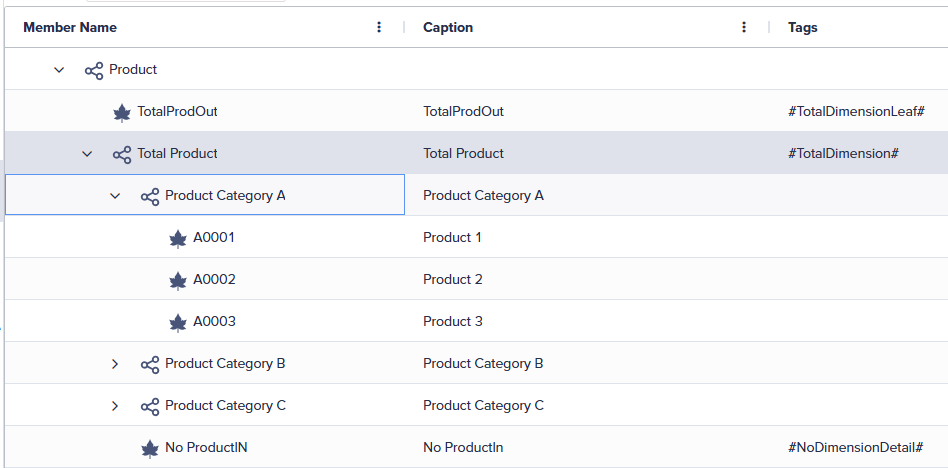
The image displays a hierarchical structure for the Product dimension.
- The TotalProdOut leaf member is assigned the #TotalDimensionLeaf tag.
- The Total Product parent member is assigned the #TotalDimension tag.
- The No ProductIN leaf member is assigned the #NoDimensionDetail tag.
The TotalProdOut member, which rolls up to Product, is outside of the Total Product member hierarchy. While the No ProductIN member, rolls up into the Total Product hierarchy.
Unallocated differences result example
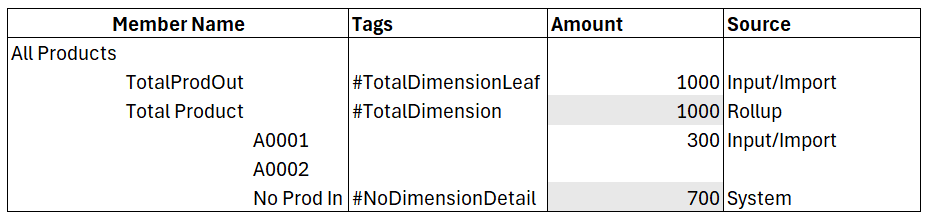
In the example, data is entered into the #TotalDimensionLeaf tagged member called TotalProdOut and into the leaf member called A0001. A0001 is a child of the Total Product member. The Total Product member is assigned the #TotalDimension tag.
After the Run Unallocated Difference process is executed, the difference of the #TotalDimensionLeaf and #TotalDimension tagged members is sent to the #NoDimensionDetail tagged member called No ProductIN.
Trigger the calculation
Before triggering the Run Unallocated Differences calculation, you need to
- Double-click a dimension defined as an Other dimension type, such as Product, in the Dimensions screen in the Models module.
- Select the Tags column for the desired member.
- Select the Add icon next to Tags in the right panel and type the tag name, such as #TotalDimension, #TotalDimensionLeaf, and #NoDimensionDetail.
- Select Update and close the member panel.
- Repeat the steps above to assign the appropriate tags to members of the Intercompany dimension if needed.
- Import or input data to the:
- #TotalDimensionLeaf member
- #TotalIntercompanyLeaf member
- A leaf member under the tagged #TotalDimension member hierarchy
- A leaf member under the tagged #TotalGroup member hierarchy
- Open the Explorer module and expand the Root, Global, Consolidation, Processes, and the Calculation folders.
- Double-click the Run Unallocated Difference process to open it.
- Select the Play icon in the upper-right toolbar to execute the Run Unallocated Difference process.
- Create a report to validate the results.
Note: You can create a Run Unallocated Difference calculation task within a workflow process.

