Variation calculation is executed to calculate the variation movement as difference between Closing with Opening and other movement members, such as Additions, Reclassification, Disposal, Allocation, etc.
Variation calculation ensures that the sum of opening and movements matches the closing balance. This is key for correct currency conversion calculation as currency conversion is done based on individual movements. Variation calculation must be executed before Conversion as this ensures the continuity schedule is balanced.
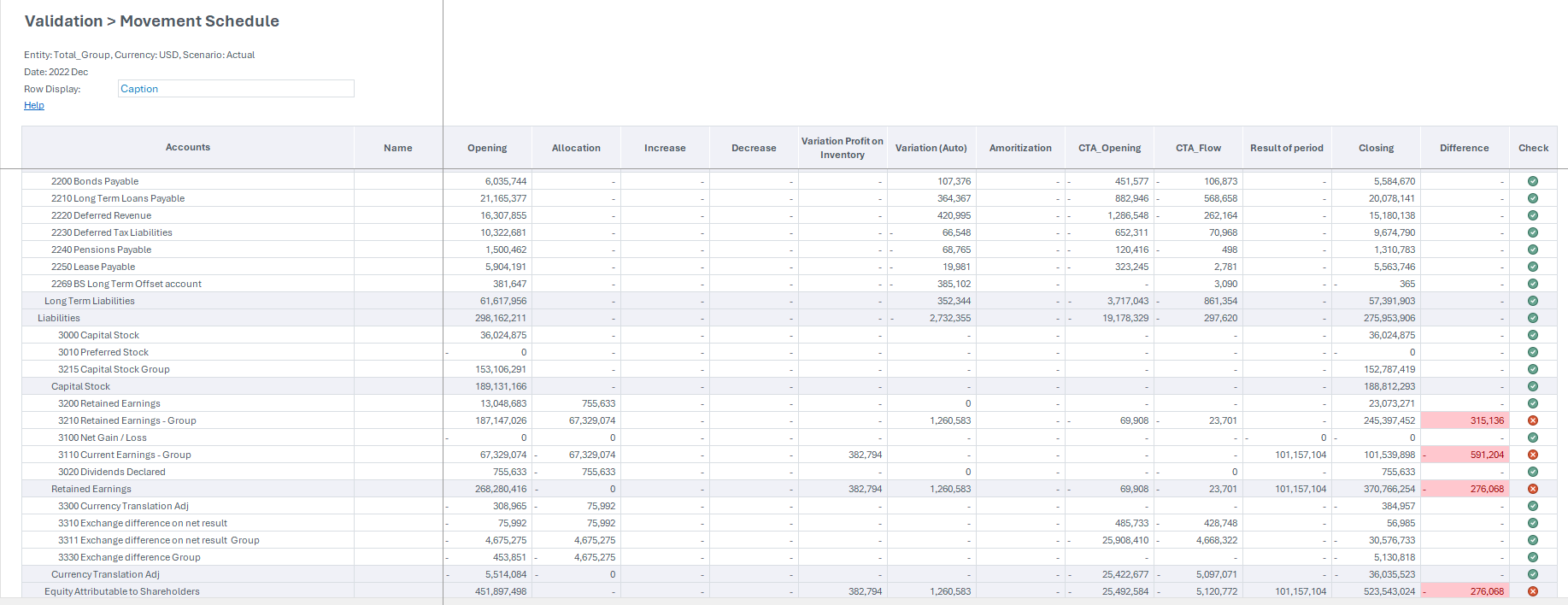
The Validations – Movement report is useful in validating that each entity has a balanced continuity schedule in local currency before running the conversion.
| Parameter | Value description |
| Accounts | Displays the name of the account. |
| Opening | Displays the beginning balance of the account for the period. |
| Allocation | Displays any allocations made to the account. |
| Business Acquisition | Displays any changes related to business acquisitions. |
| Decrease | Displays any reductions in the account balance. |
| Variation (Auto) | Displays the automatic variations or adjustments to the account balance. |
| Amortization | Displays the amortization amounts applied to the account. |
| Result of period | Displays the net change during the period. |
| Closing | Displays the ending balance of the account for the period. |
| Difference | Displays any discrepancies detected. |
| Check | A check mark indicates validation success. |
For example, the Validation Movement Schedule report provides a detailed breakdown of account balances over a specified period. It shows the opening balance, all variations, automatic and manual, and the closing balance for each account. This allows you to reconcile account activity and ensure the accuracy of financial data.