

Polaris uses a mapping key to find intersections between dimensions, creating a dimension index that acts as a direct map to every addressable cell. By providing a direct map to only the cells that contain data, the engine can deliver faster calculations with a more efficient memory use.
What is the dimension index
The dimension index is a score that represents the number of members in a line item for each dimension. It's also called the "index score."
The dimension index total (DIT) is determined by the total number of addressable cells in the line item. The DIT is a structural measure based on the total members of a dimension's underlying list. It isn't reduced by applying the Summary Method: None setting.
Note: Time and Versions are considered normal dimensions in Polaris and are included in the dimension index total.
Calculate a dimension index
The DIT for all dimensions of a line item mustn't exceed 64. If a change to a model means that the total exceeds 64, Anaplan will prevent the change and display an error message. It's important to note that this limit applies to the line item, not to a model or a module. There's no dimension index limit for a model or module. However, as best practice, line items will often have the same dimensionality as the module containing them.
Within this limit, it's still possible to plan at extremely high dimensionality. The following examples all have the total index score of 64 for a single line item:
| Example 1 | Example 2 | Example 3 |
| 2000 Products 15,000 Components 15 Level Bill of Materials 10 Plants Time | 200 Cost Centers 50 Product Families 50 Markets 150 Chart of Accounts 5 Currencies 2 FX Rates 4 Scenarios Time | 500 Salespeople 5,000 Customers 10,000+ Products Time |
Displayed below is the dimension index table:
| Bits (index) | Lower limit | Upper limit |
| 0 | 0 | 1 |
| 1 | 2 | 2 |
| 2 | 3 | 4 |
| 3 | 5 | 8 |
| 4 | 9 | 16 |
| 5 | 17 | 32 |
| 6 | 33 | 64 |
| 7 | 65 | 128 |
| 8 | 129 | 256 |
| 9 | 257 | 512 |
| 10 | 513 | 1,024 |
| 11 | 1,025 | 2,048 |
| 12 | 2,049 | 4,096 |
| 13 | 4,097 | 8,192 |
| 14 | 8,193 | 16,384 |
| 15 | 16,385 | 32,768 |
| 16 | 32,769 | 65,536 |
| 17 | 65,537 | 131,072 |
| 18 | 131,073 | 262,144 |
| 19 | 262,145 | 524,288 |
| 20 | 524,289 | 1,048,576 |
| 21 | 1,048,577 | 2,097,152 |
| 22 | 2,097,153 | 4,194,304 |
| 23 | 4,194,305 | 8,388,608 |
| 24 | 8,388,609 | 16,777,216 |
| 25 | 16,777,217 | 33,554,432 |
| 26 | 33,554,433 | 67,108,864 |
| 27 | 67,108,865 | 134,217,728 |
| 28 | 134,217,729 | 268,435,456 |
| 29 | 268,435,457 | 536,870,912 |
| 30 | 536,870,913 | 1,073,741,824 |
Calculate the index score of a single dimension
From the dimension index table, you can calculate the index score of a single dimension. If a list in your dimension is part of a composite hierarchy, then the total number of members is the sum of the members of that list and all of its parents.
For example:
- If there's dimension that's a flat list with 10 items and there's a top-level item, the total number of members is 11 (10 + 1 top-level item). This falls within the range of 9 to 16, so its index score is 4.
- If there's a dimension that's a non-composite hierarchy with 7 parent items, where each parent has 2 child items and there's no top-level item, the total number of members is 21 (7 parents + (7 x 2) child items). This falls within the next range of 17 to 32, so the index score is 5.
- If there's a dimension that's part of a composite hierarchy with 100 items, and its parent has 50 items, the total number of members is 150 (100 + 50). This falls within the range of 129 to 256, so its index score is 8.
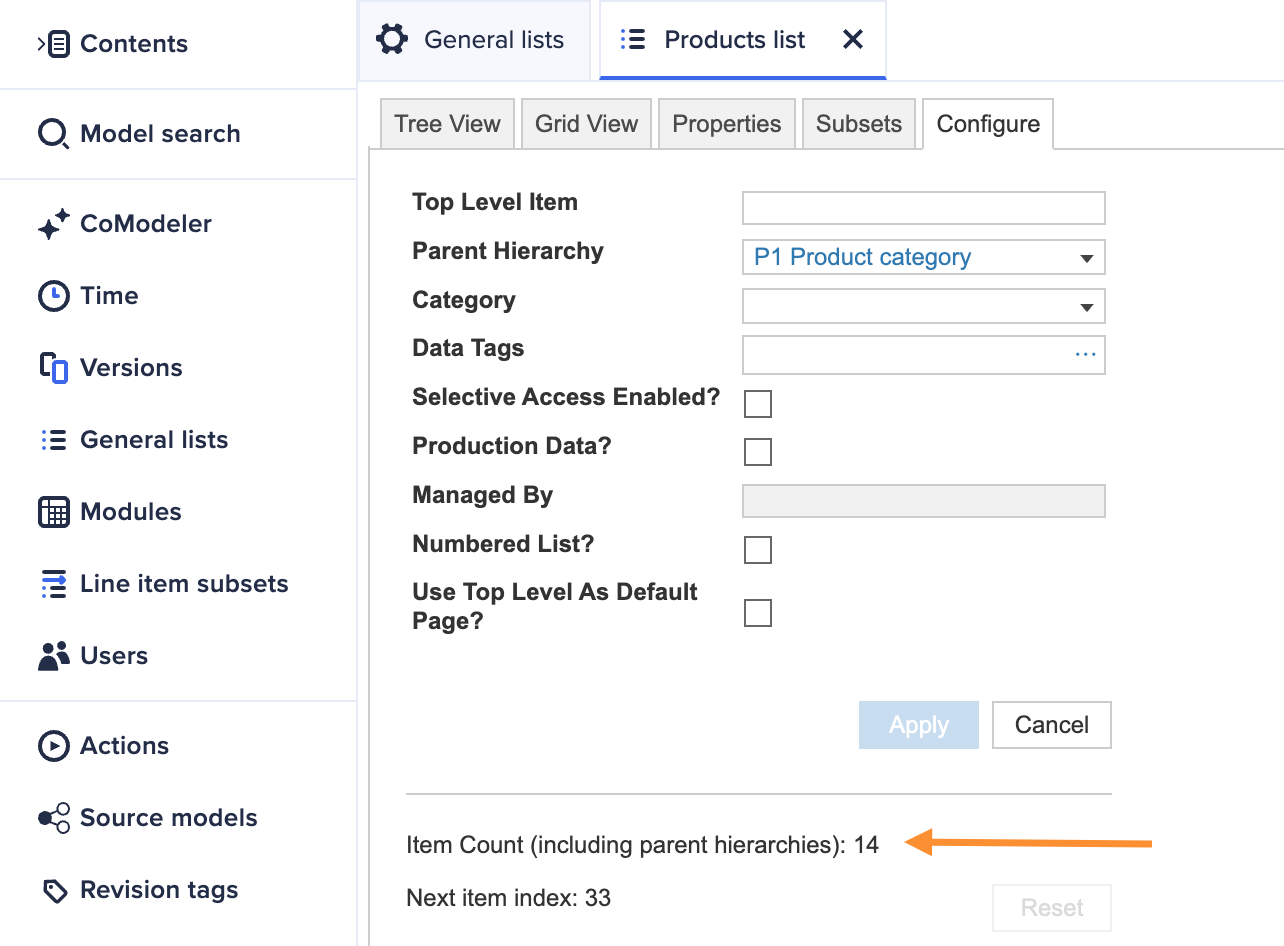
You don’t have to add these list items manually. The total number of members in a list including its parents and top level is available in the Configure tab for any list within General lists:
Calculate the index score of a time dimension
To calculate the index score of a time dimension, add together all of the periods in the time hierarchy. For example, if there's a three-year model calendar at the granularity of months, with quarter totals included:
1 (all time) + 3 (years) + 12 (quarters) + 36 (months) = 52. This gives a dimension index score of 6.
Calculate the overall DIT
To get the overall DIT for a line item, add the index scores of each of its dimensions.
For example, if a line item consists of:
- a Products list (index score: 8)
- a Customers list (index score: 10)
- and Time (index score: 5)
The DIT is 23 (8 + 10 + 5).
A small change like adding one dimension can have a significant impact, pushing the total over the limit. To prevent this, you should always understand the data you have and plan for future growth.
Note: During model design, identify highly dimensioned line items early to ensure their DIT does not exceed acceptable limits.
For example, let's calculate the DIT for Example 1 listed above:
| Example | Description | Index score |
| 2,000 Products | Falls within the range of 1,025 to 2,048. | 11 |
| 15,000 Components | Falls within the range of 8,193 and 16,384. | 14 |
| 15-Level Bill of Materials | Falls within the range of 9 to 16. | 4 |
| 10 Plants | Falls within the range of 9 to 16. | 4 |
| Time (2 years, monthly) | The total number of members is 35 (1 all time + 2 years + 8 quarters + 24 months). This falls within the range of 33 to 64. | 6 |
The DIT is 39 (11 + 14 + 4 + 4 + 6), which is under the limit of 64.
Key tactics to stay under the limit of 64
| Category | Action |
| Dimensions |
|
| Subsets |
|
| Line items |
|
| Hierarchies |
|
| Time |
|
Important things to remember
- If your index is approaching 60: Pay close attention to your list growth and be prepared to apply the above key techniques and adjust your model. Because the index score for smaller lists (such as Versions) increases with only a few additional items, even small changes are more likely to increase the DIT.
- Index and memory: Dimension index represents all available cells, but memory represents only cells with data. The dimension index itself doesn't affect memory usage or calculation effort. This is determined by the number of populated cells and the formulas used. Similarly, a line item's Summary Method (such as, None, Sum) affects calculations and memory, but doesn't change the DIT, which is a structural measure.
Note: In Polaris, Hyperspace is the total number of cells that are available to use within a model. Hyperspace represents the potential addressable cells, while memory consumption is based only on the number of populated cells. Unlike Classic, Polaris doesn't use memory for unpopulated cells.
- List management: Regularly clean up your lists by removing old or unused items. Be extra careful with lists that users can create, as they can grow quickly. Creating a few line items is sometimes better than creating small lists.
- Build smartly: During development, use full lists to test your model's structure and limits, but use only a small amount of sample data. This keeps your development model fast and responsive. Sync your test models early and often to a UAT environment with full-scale data to test performance.
- Focus on users: Always design with users in mind. A simple, easy-to-use model is always better than a complex one.
- Exceeding the limit: If an action, such as adding a dimension or importing list members, causes a line item's DIT to exceed 64, that action fails and the model displays the following error message:
[Line Item] is too large. Reduce the number of list items or use fewer dimensions.This safeguard prevents the model from entering an invalid state.

