

The financial consolidation process involves several key steps after the initial steps of configuring the solution.
The key steps include:
- Import data to Opening balances with required DataView and Audit members.
- Run:
- All
- Copy Opening process
- Copy Recurring JE
- Variation
- Conversion
- Consolidations
- Calculation (Cash Flow, First, Multi)
- YTD to Periodic
- Periodic to YTD
- Allocations
- Copy Net Income (All Dataviews, Value Only)
- Netting
- Rollover Month
- Verify results within reports
Opening balances
Opening Balances are essential to have a correct conversion and consolidation calculation. It's also important that the initial Opening Balances are loaded in the correct Dataview and Audit members. Source data in local currency, such as an entity's Trial Balance, should always be loaded in the Value Dataview member.
In contrast, the converted data should always be loaded in the Conversion Dataview member. All consolidation adjustments should be stored in the Consolidation Dataview.
Another important dimension for Opening Balances is the Audit dimension.
All initial Opening Balances must be stored in the correct Audit member. The table below provides guidance on where initial Opening Balances should be stored.
| Type of Data | Audit Member | DataView | Comments |
| Local Trial Balance in Local Currency | Import | Value | |
| Local Trial Balance in Reporting Currency | Import | Conversion | |
| Automatic Intercompany Elimination adjustments | Intercompany Eliminations | Consolidation | All eliminations that'll be posted automatically by Anaplan Financial Consolidation should be stored in this member. |
| Manual Intercompany Elimination adjustments in Local Currency | Intercos Elim Manual | Value
| All eliminations that will NOT be eliminated automatically by Financial Consolidation should be stored in this member. |
| Manual Intercompany Elimination adjustments in Reporting Currency | Intercos Elim Manual | Value
| All eliminations that will NOT be eliminated automatically by Financial Consolidation should be stored in this member. |
| Equity Pickup adjustments | Equity Pickup | Consolidation | |
| NCI | StockholderEquity | Consolidation |
It's important to load the opening balances in the correct Dataview and Audit members. It ensures that the data that is loaded into Financial Consolidation to start the system matches the data that'll be automatically calculated. If data isn't aligned, it causes discrepancies, especially in the first year.
Once the initial opening balances have been properly loaded in P12 of the previous year, run the Copy Opening process to ensure the current year has the correct opening balances in the Opening Movement member.
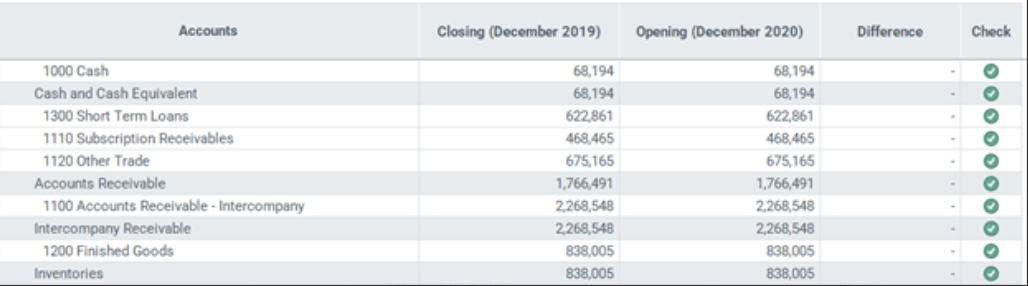
The Validation Opening Period report is useful in checking that the opening balances are correct in both local and reporting currencies.
It displays each account, the prior period's closing balance, the current period's opening balance, and shows if there's a difference. The Check column indicates whether the opening balance is consistent with the closing balance of the previous period.

