

Virtual datasets are datasets that have been shared with neighboring dataspace within the same tenant in Anaplan Data Orchestrator.
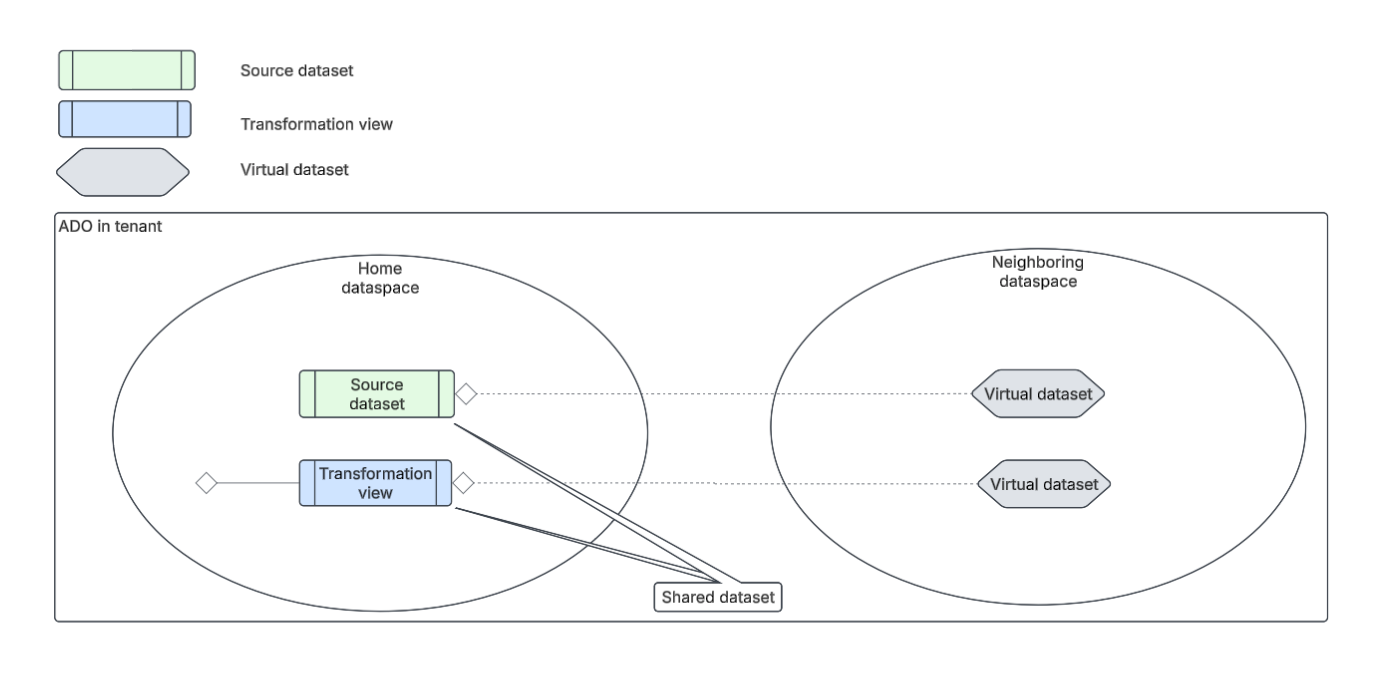
Integration administrators can share datasets from a home (source) dataspace to neighboring (target) dataspaces. Once a dataset is shared with a neighboring dataspace, it becomes a virtual dataset in that dataspace.
Set up virtual datasets
To share a dataset from a home dataspace, integration administrators must select:
- The datasets they want to share.
They can share source datasets or transformation view datasets (also referred to as derived datasets). - The neighboring dataspaces they want to share the datasets with.
They can share the dataset with multiple neighboring dataspaces. The dataspaces must be in the same tenant and region as the home dataspace. Once the dataset is shared, it is known as a virtual dataset in the neighboring dataspace.
Share and manage datasets from a home dataspace
From the home dataspace, you can:
- Share datasets with neighboring dataspaces.
- Add and remove dataspaces from the shared dataset.
For more information, see:
Use and manage virtual datasets from neighboring dataspaces
From the neighboring dataspace, you can use the virtual dataset in transformation views, model links, and pipelines. If a virtual dataset is used, the share icon displays next to the dataset name.
For more information about how to manage virtual datasets, see Manage virtual datasets from neighboring dataspaces.
Access and share permissions
Review these access and share permissions for virtual datasets.
| Action | Permissions |
| Share datasets from home dataspace | Integration administrators can share datasets with any neighboring dataspace they have access to in their tenant. The home and neighboring dataspaces must be in the same tenant and region. In those neighboring dataspaces, the shared datasets are known as virtual datasets. Virtual datasets, and those based on them, can't be shared. |
| Virtual dataset access | Virtual datasets can be used by any integration administrator who has access to the dataspace the datasets were shared with. They don't need access to the home dataspace. |
| Change source data for virtual datasets | From the neighboring dataspace, integration administrators:
Data can only be changed from the home dataspace. |
| Share transformation views created with virtual datasets | In the neighboring dataspace, transformation views created with virtual datasets can't be shared with another dataspace. |
| Delete shared dataset from the home dataspace | You can delete a shared dataset from the home dataspace. You can't undo this action or retrieve lost data after deletion. When you delete a shared dataset, the virtual dataset turns invalid in the neighboring dataspace, but it still appears in the Virtual datasets screen. Once you refresh the screen, the virtual dataset is removed. |
Dataset types reference
Data Orchestrator has different types of datasets that can be identified by their icons. Use this reference to help you decipher the different types of datasets.
| Icon | Dataset type |
| Source dataset | |
| Transformation view dataset (derived dataset) | |
| Virtual dataset |

