

Anaplan XL Reporting supports Freeform reports.
A Freeform report is a hybrid query object that combines the flexibility of cell-based reporting, similar to Anaplan XL formulas, with grid performance. It works with any type of dimensional data source and with relational sources, using a Pivot View. You can create a Freeform report to write back to the data source.
Create a Freeform report from the Report Designer
In Report Designer, select Freeform report – New from the Grids & Reports menu to create a new Freeform report.
Create a Freeform report from a grid
You can turn an existing grid into a Freeform report using the right-click menu. Right-click and select Anaplan XL > Convert to > Freeform Report. A message asks you to confirm the conversion. Select Yes. The Freeform report appears.
From Excel cells
You can insert a Freeform report directly from an Excel sheet. Anaplan XL analyzes the ranges surrounding any cell in the projected data area and builds the report from them.
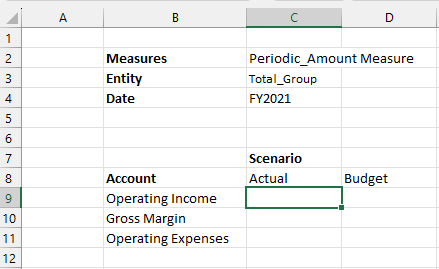
This approach requires a strict layout:
- Column dimension (such as Scenario): Place it so it vertically aligns with the top-left data cell (such as
C9in the example). - Row dimension (such as Account in the example): Add it right above the first row header, on the same rows as the innermost column headers.
- Filter dimensions (such as Measures, Entity, and Date in the example): Place them so they vertically align with the outermost row dimension (such as Account), three rows above the column dimensions.
- Member names must be text, not numbers. If you have numeric names, prefix them with an apostrophe (for example,
'2024). - You can use text line items and measures in your Freeform report.
Once you set up the layout, select any cell in the data area and choose Freeform report – From range from the Grids & Reports menu. This creates a Freeform report and fills in the data cells accordingly.
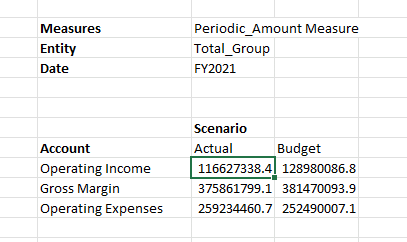
Freeform properties
You can make the data cells refresh automatically whenever a filter member changes. Right-click and select Anaplan XL > Properties, then turn on Refresh when filter cells change in the Freeform properties dialog.
We recommend leaving Display error on invalid members turned on. If you turn it off, unknown members lose their data, which could cause you to miss data without realizing it.
For more information, view the Freeform Reporting video.

