

Programmatically submits pending data changes to the underlying data source
It is used for writeback-enabled grids that are set to On Request mode. It's functionaly equivalent to selecting Submit All in the writeback task pane.
Syntax
XL3SubmitWriteback (PerformWriteback)
Parameters
| Parameter | Description |
| Performwriteback | A reference to a range containing a Boolean value of TRUE or FALSE specifying whether to perform the writeback. That cell's value will be reset to FALSE following the writeback operation. |
Example
In the example, there are pending data changes in the three grids at the top.
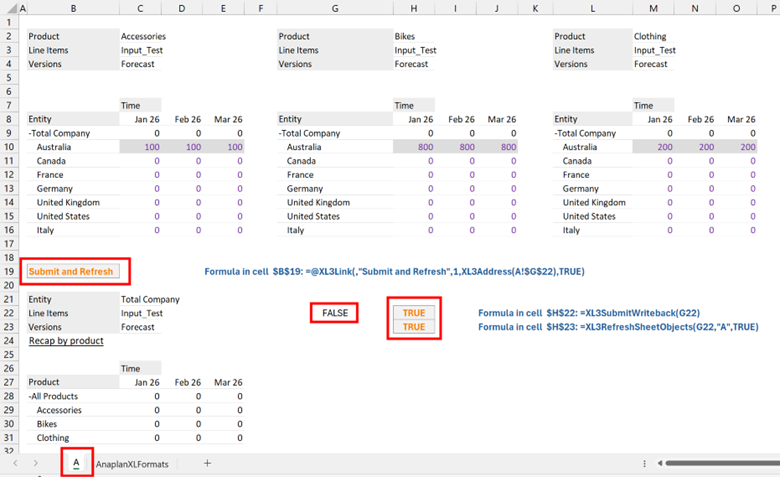
Selecting the Submit and Refresh link in cell B19 submits changes from all grids and refreshes the entire sheet to reflect them.
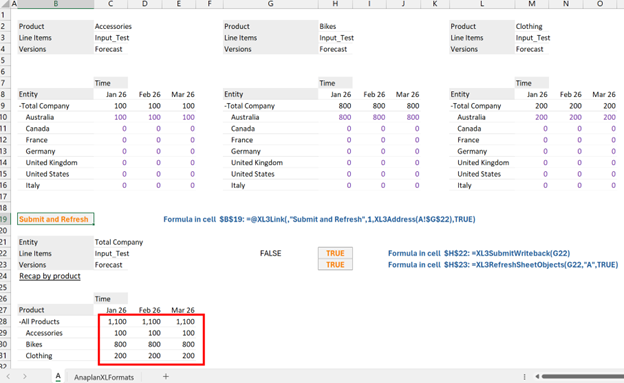
The worksheet uses a combination of three formulas to create a seamless submit and refresh process, all coordinated by a single trigger cell.
| Cell | Formula | Purpose |
| B19 | =@XL3Link("Submit writes and Refresh",1,XL3Address(A!$G$22),TRUE) | The "Button": This creates a clickable hyperlink with the text "Submit writes and Refresh". When clicked, it sets the value of the target cell, G22, to TRUE. |
| H22 | =XL3SubmitWriteback(G22) | The Data Submitter: This formula constantly monitors cell G22. The moment its value becomes TRUE, it triggers a writeback, sending any changed data from the Excel sheet to the data source. |
| H23 | =XL3RefreshSheetObjects(G22,"A",TRUE) | The Refresher: This formula also monitors cell G22. When it detects the value TRUE, it initiates a refresh of all Anaplan XL objects on Sheet "A" immediately after the writeback completes. |

